


n8n (pronounced "n-eight-n") is a platform for building automations. On one screen you connect boxes called nodes, and each box does one thing, like receiving a form from your website, adding a row to a spreadsheet or sending a message. The whole chain is called a workflow, and once it's built it runs on its own every time the event you chose happens.
In short
- n8n is a tool for building workflows: a diagram of nodes that moves data from one system to another, plus a trigger that decides when it starts.
- You no longer have to build by hand. I asked an AI agent for three automations business owners actually need, and each one was built in n8n in two to three minutes.
- A modest calculation: if five hours a week of one average US employee's work move to automation, that time is worth about $1,020 a month. There's a calculator below.
- You run n8n in its cloud, for a monthly fee, or on your own server with the free Community edition. Either way, someone in the business has to check and maintain what was built.
Prefer to watch? The guide in a 5-minute video
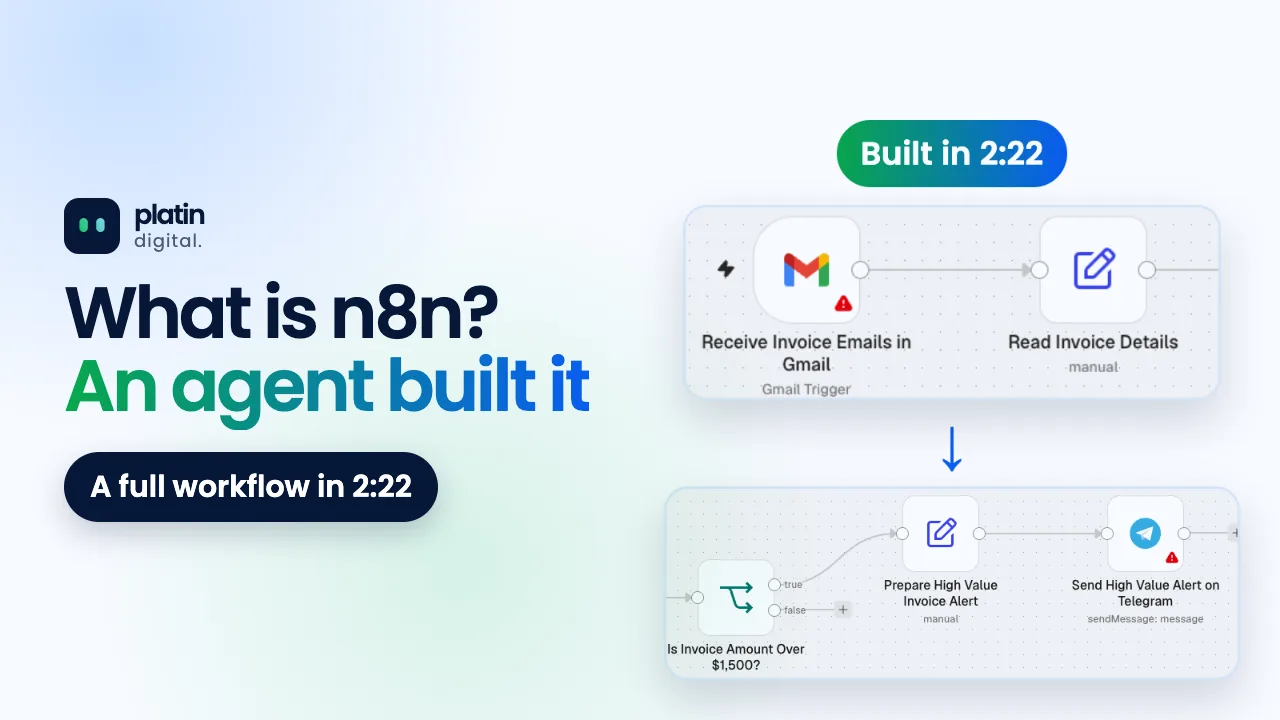
What is n8n, in one picture
If you've ever set up a smart-home routine like "when the front door opens after sunset, turn on the porch light," you already get the idea. One event starts everything, and a fixed chain of actions follows, each on a different device.
n8n does the same thing for a business's software. The event is a form sent from your website, an email with an invoice, or 8:00 AM every morning. The actions are a row in a spreadsheet, a message on Telegram or a new record in your CRM. In between you can add conditions, like "only if the amount is over $1,500, let me know."
How does n8n work?
For example, in this workflow an email with an invoice starts a run that ends with a message to you, but only when there's a reason to look:
One n8n workflow, from the email to the alert
- TriggerAn email arrives with an invoice attached
- Read the detailsVendor, amount and date are pulled from the file
- Spreadsheet rowThe invoice is logged in the tracking sheet
- Condition and alertOver $1,500? You get a Telegram message
Every box in the diagram is a node. These are the terms you'll meet the first time you open the editor, according to n8n's official glossary:
- Trigger: the first node, the one that starts the workflow. A Webhook, for example, receives data from another system the moment something happens there, and a Schedule Trigger runs the workflow at a set time, every day, week or month.
- Node: one step. Some nodes work inside a specific system, like a spreadsheet or an inbox, and some are logic nodes that split the path based on a condition.
- Execution: one run of the workflow, from the trigger to the end. Every invoice email starts a new execution.
- Credentials: the login details n8n uses to access each system on your behalf. They're stored inside n8n, so whoever manages n8n effectively holds access to everything connected to it.
n8n's documentation calls it a low-code tool, meaning you can build a lot without writing code. When no node does exactly what you need, you add a Code node with JavaScript or Python.
How to build a workflow today: ask an AI agent
You don't have to drag nodes and wire them up by hand, and I don't recommend it. n8n has an official MCP server, a connection that lets an AI agent or a coding assistant like Claude Code or Codex work directly with your n8n. According to n8n's documentation, the agent can create a new workflow from a plain-language description, and edit an existing one (from n8n version 2.13).
In practice, you write what you want the way you'd brief an employee: "Every invoice that comes into my inbox, log it in the spreadsheet, and ping me on Telegram if it's over $1,500." The agent builds the workflow, and you check on a real invoice that it does what you asked.
The real payoff comes after the build. When a form field changes or a system updates, you tell the agent what changed, and it updates the workflow instead of you hunting for the right node. n8n's editor now also has a built-in AI Workflow Builder that turns a description into a workflow; in n8n's cloud, each request to it uses a credit.
How much of a business's work can be automated?
In a November 2025 study, the McKinsey Global Institute estimated that technology that already exists could, in theory, automate activities that take up about 57% of US work hours. Most of that, 44%, is computer work, the kind software and AI agents do. The other 13% is physical work for robots.
Share of US work hours that could, in theory, be automated
Source: McKinsey Global Institute, Agents, robots, and us, November 2025. This is the technical potential of technology that has already been demonstrated, not a forecast and not what businesses have actually done.
It's worth reading that number carefully. McKinsey says plainly that it is not a forecast of job losses, and that real adoption may take decades. So 57% is the ceiling of what's possible, not what will happen in your business next year.
The same report has a figure that explains the gap. Nearly 90% of companies say they've invested in AI, but fewer than 40% report gains they can measure. McKinsey's explanation: AI gets bolted onto single tasks instead of redesigning the whole process. That's exactly where a workflow comes in, because it describes an entire process, from the first event to the last message.
A modest calculation: what it's worth in dollars
So let's do a more modest calculation, for one employee.
In US private industry, employers paid an average of $46.89 per hour worked in wages and benefits in June 2026, according to the Bureau of Labor Statistics. Call it about $47 an hour.
Now two assumptions, which are mine and not data. First: 10 hours a week go to work that repeats itself. That's about a quarter of a work week, which fits a 2017 Smartsheet survey in which over 40% of the US office workers surveyed said at least a quarter of their week goes to manual, repetitive tasks. Second: half of those hours move to automation.
The result: five hours a week, about 21.7 hours a month, worth about $1,020 a month. Over a year, that's about $12,200. For one employee.
Calculator: what the time automation frees up is worth
$1,020value of the time per month
$12,200value of the time per year
Illustration. The starting values are the example above. The math: hours per week × cost per hour × share automated × 52 weeks. This is the value of the time freed up, not cash saved.
Three caveats, so the number doesn't mislead:
- The 10 hours and the half are assumptions. Change them in the calculator to match what really happens in your business.
- Your own hourly cost may be different. $46.89 is the average across US private industry. For office and administrative support jobs, the same BLS data shows $36.73 an hour.
- Freed-up hours are only worth money if they go to something else. That amount doesn't land in the bank on its own.
The bottom line: even with modest assumptions, the time that goes to repetitive work is worth a lot. The real question is where to start.
Three automations business owners actually want
I picked three automations that touch customers and money directly: a missed call, a lead from your website, and a client who might forget their appointment. I asked an AI agent for each one in a single plain-language sentence, through n8n's official MCP server. Two to three minutes later, each one was built.
Here's how I tested. n8n runs on my own computer, with no real accounts connected. So each request also had a few lines saying there were no real connections yet and that the test should use sample data. The agent's permissions didn't let it run the test, so I ran it myself.
No message was actually sent, which is why the screenshots show a red triangle on every step that needs an account. What the test does show: every item reached the right step.
Sources: Invoca, analysis of more than 70 million calls, 2026. Hennessey Digital, test inquiries to 1,333 US law firms, 2025. Robotham et al., BMJ Open, review of 21 studies, 2016. The first two were published by companies that sell a fix for the problem they measure.
1. Missed call: an instant text back
You're in the middle of a job, the phone rings, and your hands are full. Invoca, a company that sells call-tracking software, analyzed more than 70 million calls to businesses: only 56% of callers spoke with a person. Even counting only calls longer than 15 seconds, about a third went unanswered.
And what do people do when nobody picks up? In a 2025 CallRail survey of 1,000 US consumers, only 42% said they leave a voicemail. In other words, more than half the callers you miss won't leave you a message.
What I asked the agent: "Every call to the business that I don't pick up, send the caller an automatic text message: 'Hi, sorry I missed your call. How can I help?', add them to my leads spreadsheet, and ping me on Telegram."
In 128 seconds it built a box that receives an event from the phone system for every call, a condition that checks whether the call was missed, and three actions: a text to the caller via Twilio, a row in the spreadsheet and a Telegram alert to me. In the test, two sample calls came in, one answered and one missed. Only the missed one passed the condition and reached the three actions.
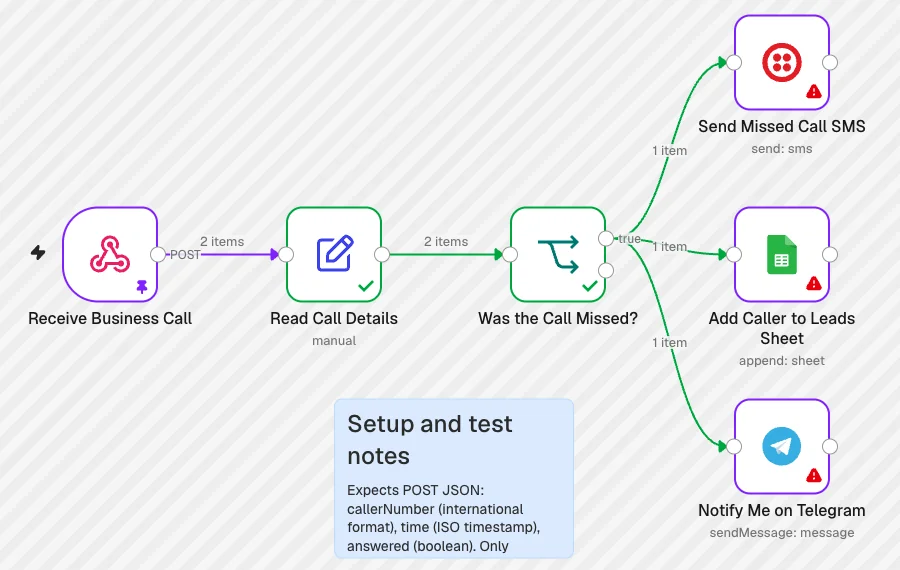
To make this work for real, your phone system has to be able to notify n8n about every call, and you need an SMS account such as Twilio.
2. Website lead: a personal reply, with their name
Someone left their details on your website, and now they're waiting. Hennessey Digital, a marketing agency for law firms, sent test inquiries through the website forms of 1,333 US law firms. 26% never responded, and the median response time was 13 minutes.
That's one industry, and a study by a company that sells marketing, but the takeaway is simple: roughly one inquiry in four got no answer at all.
What I asked the agent: "Every lead that comes in from the form on my website, text them back in under a minute with a personal message using their name, add them to my leads spreadsheet, and ping me on Telegram with their details so I can call them."
In 125 seconds it built a box that receives the lead from the form, two boxes that prepare the details and write a personal message, and three actions: SMS, spreadsheet and Telegram. In the test, one sample lead came in: Sarah, asking for a quote. The message that reached the send step opened with "Hi Sarah, thanks for reaching out!", and the lead also reached the spreadsheet and the Telegram alert.
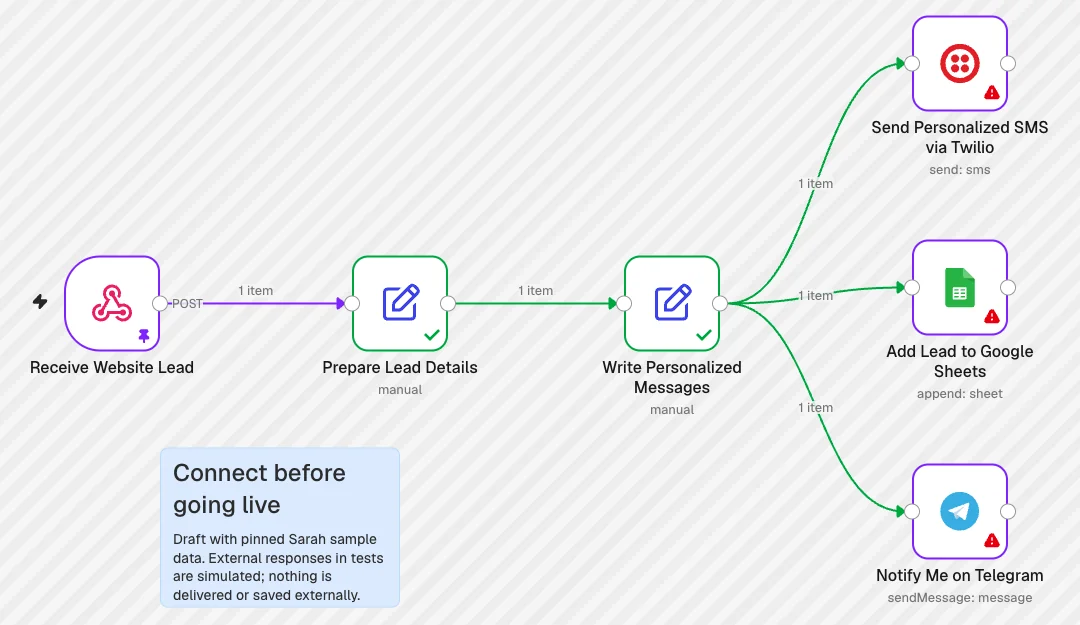
The test doesn't measure the "under a minute" part, because no message was sent. You can only measure that once the form and the SMS account are connected.
3. Appointment reminder, the evening before
An appointment a client forgot is an empty hour in your calendar. A review published in BMJ Open in 2016 pooled 21 studies, most of them controlled trials. People who got a reminder message missed their appointment 15% of the time, compared with 21% without a reminder. That's about a quarter fewer empty slots. One more finding from the same review: several reminders worked better than a single one.
The studies were done in clinics, with text messages. Even so, it's the strongest source I found, because it's a peer-reviewed review of studies, not a survey by a company selling the fix.
What I asked the agent: "Every evening at 6, check my Google Calendar for tomorrow's appointments, and text each client a reminder with their time, asking them to confirm."
In 172 seconds, still under three minutes, it built a schedule for every evening at 6 PM, a step that reads tomorrow's appointments from Google Calendar, a filter that keeps valid client appointments, a personal reminder for each client and a send step via Twilio SMS. The test had three sample appointments for tomorrow, and three reminders reached the send step, each with its own client's time: 9:00 AM, 11:30 AM and 1:15 PM.
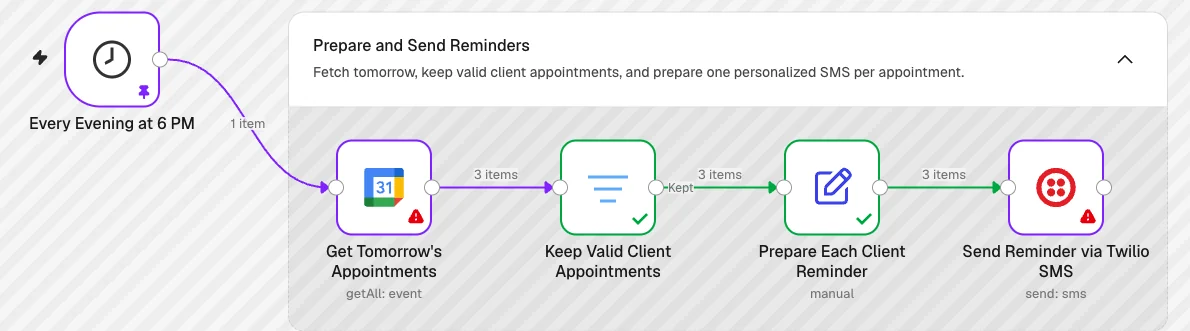
Three requests, and three builds of about two to three minutes each. What's left in a real business is connecting the accounts, testing on one real inquiry, and only then switching it on. If I had to pick one to start with, I'd start with missed calls, because they catch people who already tried to reach you.
n8n's own website shows other kinds of workflows too, such as a refund request that waits for a manager's approval, or a daily digest that arrives every morning.
What you need to run n8n: cloud or your own server
According to n8n's documentation, there are two main ways to use it:
n8n Cloud
n8n runs the server
- Sign up and start building, no installation
- n8n handles hosting, updates and scaling
- You pay by the number of executions per month
- This is what n8n recommends for people without technical skills
Self-hosted
n8n runs on your server
- Free Community edition, with no time limit
- Installation takes technical skills, for example with Docker, software that runs apps on a server
- The server, updates and maintenance are on you
- Your data goes through a server you chose
In n8n's cloud you pay by the number of executions per month, and the current prices are on their pricing page. An execution counts a whole workflow: a process with 15 nodes counts as one execution, and manual test runs don't count at all.
The Community edition is missing a few things a team of two or more notices quickly: you can't share workflows and credentials between users, and there's no single sign-on with your company account (SSO) and no version control through Git. You only get those on the paid Business and Enterprise plans.
Where n8n is strong, and where it gets hard
Where it's strong:
- Flexibility. According to n8n's website, it has more than 500 built-in integrations, plus a Code node for anything that doesn't have a node of its own.
- Control. If you install it on your own server, you decide where the data lives and who gets in.
- Pricing that suits long processes. Because you pay per execution and not per step, a detailed workflow doesn't cost more than a short one.
Where it gets hard:
- Someone has to understand what was built. Even when an AI agent builds the workflow, someone needs to check that it does what you asked, and roughly understand how data moves between the nodes.
- A workflow only does what it was drawn to do. An inquiry with no phone number, or an invoice in a new format, will keep running down the same path unless someone added a branch for it in advance. You also only get alerted about a failure if you set up a dedicated error workflow for that workflow.
- Maintenance. Systems update, form fields change, and if you self-host, updating n8n itself is on you too.
n8n vs Zapier vs Make: what's the difference
At their core, all three do the same thing: a trigger followed by actions in other systems. The differences are in the names, the pricing and where it runs:
| n8n | Zapier | Make | |
|---|---|---|---|
| What a process is called | workflow | Zap | scenario |
| What you pay for | one execution of a whole workflow | tasks | credits, usually one credit per action |
| Install on your own server | Yes, including a free edition | Zapier describes itself as fully managed, with no infrastructure to set up | Not offered on the pricing page |
The difference you feel most on the bill: in n8n, a process with 20 steps counts as one execution, while in Make each action in the process usually uses a credit. Zapier itself says it's built for non-technical users, and that setting up n8n is more technical.
n8n and AI agents
n8n is no longer only about workflows. The main headline on its website now talks about "agents and workflows," and inside the tool there's an AI Agent node: you connect a language model and tools to it, and it decides on its own which tool to use to complete a task. Alongside it there are standalone agents you talk to in Slack, Telegram or Microsoft Teams and can schedule to run every hour or day. As of November 23, 2026, they're still in Preview (an early version), and n8n's documentation says they can make mistakes and that their behavior will still change.
Here too, someone in the business sets up and maintains the agent, its permissions and its connections, inside a tool you have to learn. For a small business without a technical person on staff, I see a managed AI agent as the up-to-date way to get the same work done: you give it a goal in plain language, and whoever set it up also maintains it. I wrote the full comparison, including the cases where a workflow is still the better choice, in n8n or an AI agent. And here's how we do it: business automation with an AI agent.
Related terms
- What is an AI agent: a system that takes a goal and chooses the steps on its own.
- What is MCP: the standard n8n uses to connect to agents and other AI tools.
- What is an LLM: the language model that powers the AI Agent node.
- What is business automation: the bigger picture, where n8n is one tool among several.
- n8n or an AI agent: when each one fits a small business.
Frequently asked questions
What is n8n?
n8n is a platform for building automations visually. You build a workflow out of nodes, where each node does one thing, like receiving a form, writing to a spreadsheet or sending a message, and a trigger decides when the process starts. You can use it in n8n's cloud or install it on your own server.
What does n8n stand for?
According to n8n's code repository, the name is short for nodemation: "node" for the interface built from nodes and for Node.js, and "mation" from automation. In writing, it's the first letter n, the last letter n, and the eight letters in between. It's pronounced "n-eight-n."
Do I need to know how to code to use n8n?
No. You can ask an AI agent to build the workflow through n8n's official MCP server, or use the built-in builder in the editor. Even by hand, a simple workflow, like a form that gets logged in a spreadsheet, is built by connecting ready-made nodes, with no code at all. As the process gets more complex, you'll need JavaScript expressions or code in a Code node, and self-hosting also takes the skills to install and maintain a server.
Is n8n free, and how much does it cost per month?
The Community edition, which you install on your own server, is free with no time limit, but the server cost and the maintenance time are on you. In n8n's cloud you pay monthly by the number of executions, and the current price is on their pricing page. The code is public on GitHub, but it isn't open source in the classic sense: its license, the Sustainable Use License, allows use and changes for your business's internal purposes or for personal use.
Is n8n AI?
Not in the sense that it thinks. n8n runs exactly what was built in it, down the same path every time. But you can put an AI Agent node inside it, connect a language model, for example from OpenAI, Anthropic or Google, and that box does decide on its own which tool to use to complete a task.
What is n8n best for?
Work whose path is known in advance and repeats the same way every time: a missed call, a website lead, an appointment reminder or an invoice logged in a spreadsheet. It's less suited to tasks that look different every time, because a workflow only does what was built into it.
What's the difference between n8n, Zapier and Make?
All three build automations from a trigger and actions. Zapier is a fully managed service aimed at non-technical users, and you pay by tasks. In Make you pay in credits, usually one credit per action. n8n can also be installed on your own server, and in its cloud you pay per execution of a whole workflow, no matter how many steps it has. n8n is more flexible, but setting it up is more technical.
Is n8n outdated now?
No. The tool does what it was built to do well, and n8n keeps adding AI features to it, such as the AI Agent node, a built-in builder and an MCP server. What has changed, in my view, is that a small business now has a simpler option: an AI agent that someone sets up and maintains for you. When needed, it builds a workflow, and when not, it does the work itself, in the software you already use.
Sources
- https://n8n.io/
- https://n8n.io/pricing/
- https://github.com/n8n-io/n8n
- https://github.com/n8n-io/n8n/blob/master/LICENSE.md
- https://docs.n8n.io/key-concept-glossary
- https://docs.n8n.io/choose-how-to-use-n8n
- https://docs.n8n.io/deploy/host-n8n
- https://docs.n8n.io/deploy/host-n8n/community-edition-features
- https://docs.n8n.io/build/code-in-n8n
- https://docs.n8n.io/build/flow-logic/handle-errors-gracefully
- https://docs.n8n.io/build/understand-workflows/understand-executions
- https://docs.n8n.io/integrations/builtin/core-nodes/n8n-nodes-base.webhook
- https://docs.n8n.io/integrations/builtin/core-nodes/n8n-nodes-base.scheduletrigger
- https://docs.n8n.io/integrations/builtin/cluster-nodes/root-nodes/n8n-nodes-langchain.agent
- https://docs.n8n.io/build/build-and-manage-agents
- https://zapier.com/how-it-works
- https://zapier.com/blog/what-is-n8n/
- https://www.make.com/en/pricing
- https://www.mckinsey.com/mgi/our-research/agents-robots-and-us-skill-partnerships-in-the-age-of-ai
- https://www.bls.gov/news.release/ecec.nr0.htm
- https://www.bls.gov/news.release/ecec.t04.htm
- https://www.smartsheet.com/content-center/product-news/automation/workers-waste-quarter-work-week-manual-repetitive-tasks
- https://invoca.com/reports/the-invoca-lead-conversion-benchmarks-report-2026
- https://www.callrail.com/blog/missed-calls-cost-businesses-more-than-ever
- https://hennessey.com/2025-lead-form-response-time-study/
- https://pmc.ncbi.nlm.nih.gov/articles/PMC5093388/